Landmark Asset
A ULandmarkAsset is a Data Asset used to define a specific landmark and how it should behave on various LandmarkNavigation systems (Minimap, Compass etc…).
Create ULandmarkAsset for each different landmarks you wish to have in your game and properly assign them to ULandmarkComponent in your actors.
Usage:
- Create a
ULandmarkAsset - Assign it to a
ULandmarkComponent, itself assigned to an actor - Spawn the actor in the level. The landmark will be seen by LandmarkNavigation systems.
Properties
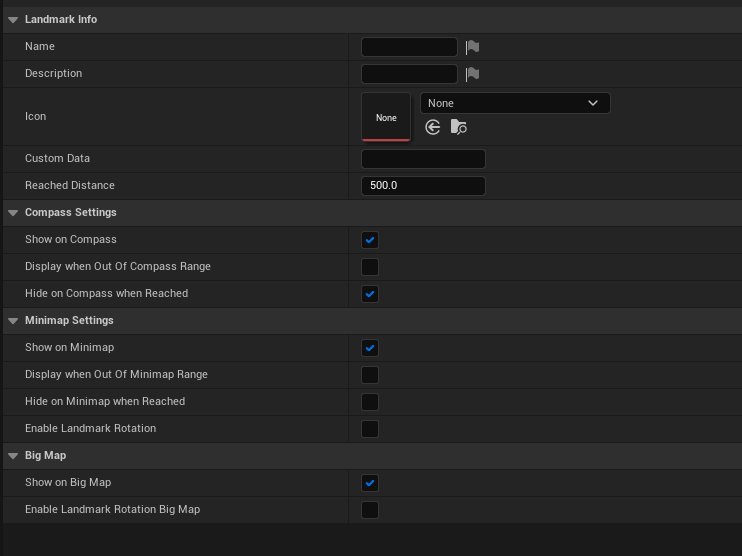
Landmark Info
| Property Name | Description |
|---|---|
| Name | Name of the Landmark (Not used by LandmarkNavigation) |
| Description | Description of the Landmark (Not used by LandmarkNavigation) |
| Icon | Texture to represent the landmark on the minimap, compass and waypoint widgets. Only available when bUseSlateIcon is set to false. |
| bUseSlateIcon | If true, use the SlateIcon struct instead of the Icon Texture2d to represent this landmark on screen. |
| SlateIcon | Texture or UI material to represent the landmark on the minimap, compass and waypoint widgets. This offers more customisation than the Icon UTexture2D. Only available when bUseSlateIcon is set to false. Please note that if you use a UI Material, the ‘Draw Debug Landmark’ feature won’t be able to display the material (see ULandmarkComponent). |
| Custom Data | Use this field if you need to save some extra data for your game logic (Not used by LandmarkNavigation) |
| Reached Distance | Controls how close to the landmark the player has to be to trigger the OnLandmarkReached event |
Compass Settings
| Property Name | Description |
|---|---|
| Show On Compass | If true this object can be displayed on the compass |
| Display when Out Of Compass Range | If true this object will be displayed even when it is not in the compass’s visible distance range (ie: even when very far away) |
| Hide on Compass when Reached | If true this object will be hidden on the compass when it is reached |
Minimap Settings
| Property Name | Description |
|---|---|
| Show On Minimap | If true this object can be displayed on the minimap |
| Display when Out Of Minimap Range | If true this object will be displayed even when it is not in the minimap’s visible distance range (ie: even when very far away) |
| Hide on Minimap when Reached | If true this object will be hidden on the compass when it is reached |
| Enabled Landmark Rotation | If true, the landmark icon on the minimap will rotate according to the landmark’s world rotation |
BigMap Settings
| Property Name | Description | |
|---|---|---|
| Show On BigMap | If true this object can be displayed on the minimap | |
| Enabled Landmark Rotation | If true, the landmark icon on the minimap will rotate according to the landmark’s world rotation |